Test your hreflang tags in four steps
- 1
Download Crab
Download the free app for macOS, Windows or Linux. - 2
Crawl your site
Enter your homepage. Crab reads hreflang from every page's HTML and HTTP headers. - 3
Open the Hreflang tab
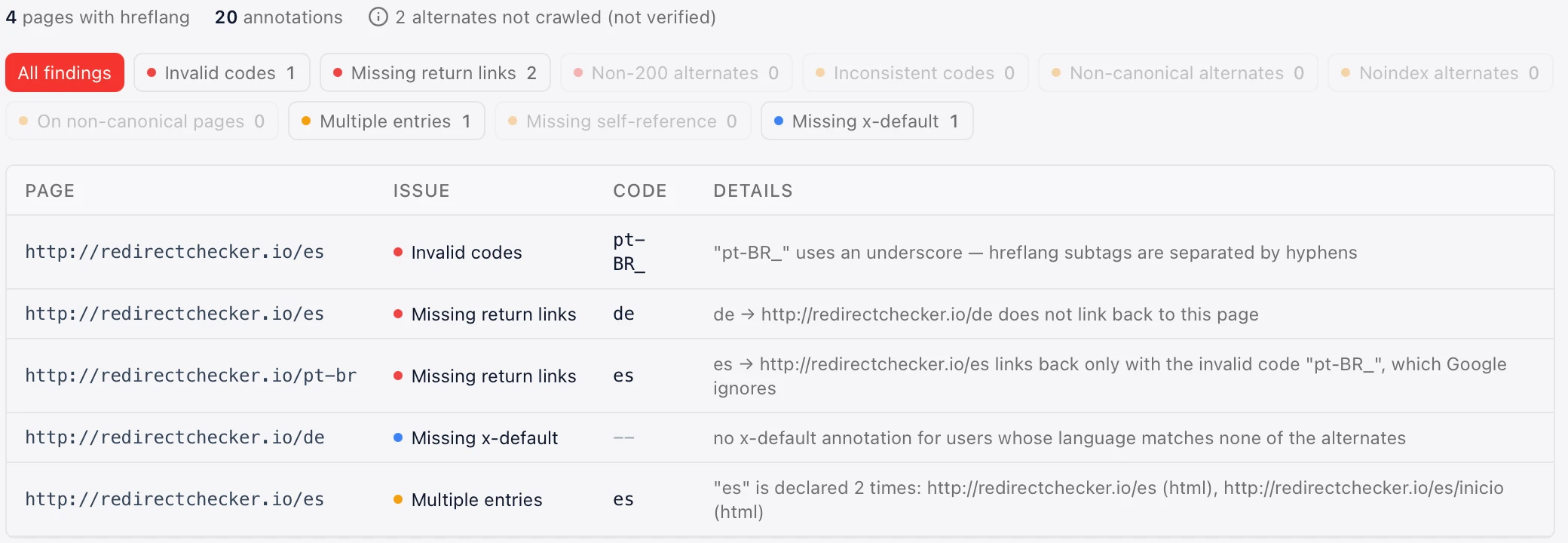
Every problem with the page, the code, the alternate URL and what's wrong. The Issues view groups them by type. - 4
Fix and re-crawl
Each finding includes the fix. Crawl again and Compare shows which hreflang issues are gone.
The 10 hreflang checks
Everything Google needs to show the right language version, checked on every page.
Invalid language or region codes
Catches codes Google ignores and tells you the fix: en-UK → en-GB, en_US → en-US, iw → he.
Missing return links
If page A lists page B, page B must list page A. Without the return link, Google ignores the pair.
Alternates that don't return 200
Alternates that redirect, return 404 or 5xx. Hreflang must point at the final, working URL.
Inconsistent return codes
Page B links back to page A, but with a different language code than page A uses for itself.
Non-canonical alternates
Alternates whose canonical tag points somewhere else. Hreflang should only reference canonical URLs.
Noindex alternates
Alternates that tell search engines not to index them, which cancels the hreflang relationship.
Hreflang on non-canonical pages
Pages that carry hreflang but canonicalise to another URL. Google uses the canonical's annotations instead.
Duplicate entries
Two or more URLs for the same language code on one page, so search engines can't tell which one to show.
Missing self-reference
Each page should list itself among its alternates.
Missing x-default
No fallback for visitors whose language or country isn't covered.
Hreflang x-default, explained
x-default tells search engines which page to show when none of your languages match the visitor. It's usually your international homepage or a language selector.
- Add it to every page in the set, pointing to the same fallback URL
- The fallback page lists all alternates too, including itself
- It's optional, but without it Google picks a version for you
- Crab flags pages that are missing it
<link rel="alternate" hreflang="en" href="https://example.com/" />
<link rel="alternate" hreflang="de" href="https://example.com/de/" />
<link rel="alternate" hreflang="es" href="https://example.com/es/" />
<link rel="alternate" hreflang="x-default" href="https://example.com/" />
Hreflang and canonical tags
The most damaging hreflang mistake is a canonical that points to another language. It tells Google the page is a duplicate, and the hreflang set falls apart.
- Each language version canonicalises to itself
- Hreflang points to the canonical URL of each alternate
- Never canonicalise all languages to the English page
- Crab flags non-canonical alternates and hreflang on non-canonical pages
<link rel="canonical" href="https://example.com/de/" />
<link rel="alternate" hreflang="en" href="https://example.com/" />
<link rel="alternate" hreflang="de" href="https://example.com/de/" />Hreflang in HTML, HTTP headers or XML sitemaps
Three equivalent ways to tell Google about your language versions. Use one per URL.
<link rel="alternate"
  hreflang="de"
href="https://example.com/de/" />Link: <https://example.com/de/doc.pdf>;
rel="alternate"; hreflang="de"<url>
<loc>https://example.com/</loc>
<xhtml:link rel="alternate"
hreflang="de"
href="https://example.com/de/" />
</url>Crab checks hreflang in HTML and HTTP headers. Sitemap annotations are equally valid for Google; if you use them, keep the same rules: every URL lists all alternates, including itself.
Common hreflang mistakes and how to fix them
- 01Most common
Missing return links
Add the missing annotation on the alternate, so both pages list each other.
- 02Ignored by Google
Wrong codes: en-UK, en_US, english
Use ISO codes with a hyphen: en-GB, en-US, en. Crab suggests the right code.
- 03After migrations
Alternates that redirect or 404
Point hreflang straight at the final 200 URL, especially after a migration.
- 04Biggest impact
Canonicals pointing to another language
Self-referencing canonicals on every language version.
- 05Recommended
No x-default
Add a fallback for visitors your languages don't cover.
Crab vs online hreflang testers
Online testers are handy for one URL. A crawler checks the relationships across the whole site.
| Crab | Online single-URL testers | |
|---|---|---|
| Pages checked | Every page in one crawl | The URLs you paste |
| Return links across the site | ||
| Invalid codes with the fix | ||
| Alternates that redirect, 404 or are noindex | ||
| Canonical conflicts | ||
| HTTP header annotations | ||
| Re-check after fixes and compare | ||
| Full technical SEO audit in the same crawl |
Capabilities of online testers vary by tool; “partial” means some testers support it for the URLs you provide.
Frequently asked questions
Yes. Crab is a free desktop app with no URL limit and no account. The hreflang checks run on every crawl.
More questions? hey@crab.so or r/crabdotso
Check your hreflang tags in minutes
Free, no URL limits, every finding with the fix.
Download Crab, freemacOS · Windows · Linux · no account · no URL limits