Crawl a JavaScript website in four steps
- 1
Download Crab
Download the free app for macOS, Windows or Linux. - 2
Turn on JavaScript rendering
Auto-detect renders pages that look like JavaScript apps; Always render JS renders every page. - 3
Crawl
Crab fetches each page, renders it in Chrome, and keeps both versions to compare. - 4
Open JavaScript issues
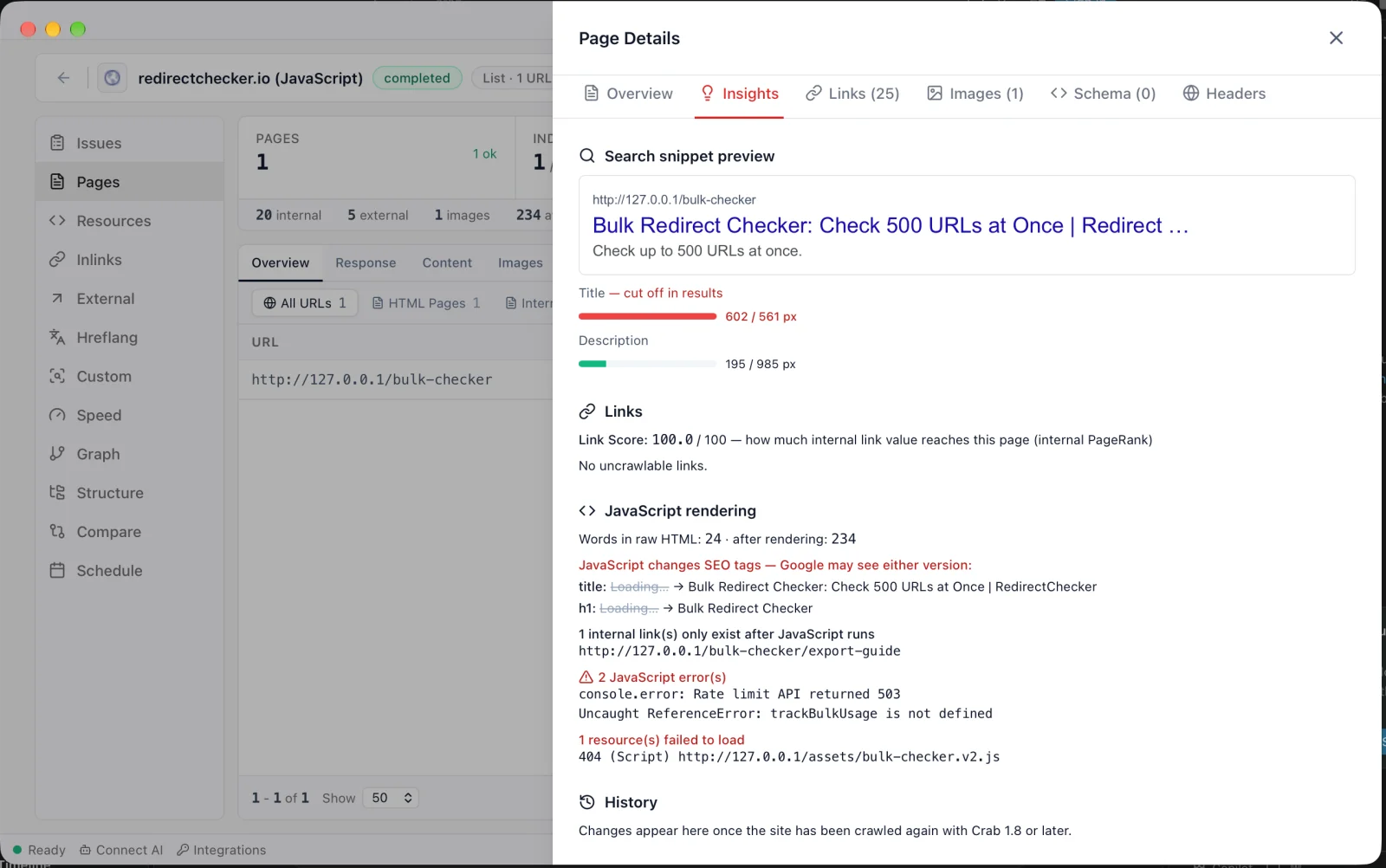
Issues → JavaScript lists the pages, and each page's Insights tab shows exactly what differs.
What Crab checks on JavaScript pages
JavaScript changes SEO tags
Title, meta description, canonical, meta robots or H1 that differ between the raw HTML and the rendered page.
Content depends on JavaScript
Pages whose main text mostly appears only after JavaScript runs: at least twice the words, and 100+ more, once rendered.
Links only found after JavaScript
Internal links that don't exist in the raw HTML, so crawlers that don't render can't discover those pages.
JavaScript errors
Uncaught exceptions and console errors, with the message, on every rendered page.
Failed resources
Scripts, stylesheets, images and API calls that return 4xx/5xx or fail to load.
Uncrawlable links
<a> tags without an href, javascript: links and elements that navigate with onclick, which Google can't follow.
Raw vs rendered HTML, page by page
Google renders JavaScript, but later and not always, and many other search engines and AI crawlers don't render at all. Crab shows what each of them gets.
- Word count in the raw HTML and after rendering
- SEO tags JavaScript changes, old value next to new
- Internal links that only exist after JavaScript
- Console errors and failed scripts, with the URL
<title>Loading…</title>
<h1>Loading…</h1>
<div id="app"></div><title>Bulk Redirect Checker | …</title>
<h1>Bulk Redirect Checker</h1>
<div id="app"><p>Paste up to 500 URLs…</p>
<a href="/bulk-checker/export-guide">…</a></div>Fixing JavaScript SEO problems
What to do with each finding, most important first.
- 01Critical
Canonical or robots changed by JavaScript
Serve the final values in the HTML. Conflicting raw and rendered directives can drop pages from search.
- 02Indexing
Main content only after JavaScript
Render it on the server (SSR, static generation or pre-rendering) so it's in the HTML response.
- 03Discovery
Links only after JavaScript
Put important navigation and content links in the server HTML as real <a href> links.
- 04Rendering
Failed scripts and API calls
Fix or remove broken resource URLs; a failed script can hide content from Google's renderer.
- 05Stability
Console errors
Open the page with the browser console and fix the listed errors.
Crab vs single-URL rendering tests
Google's testing tools show one URL at a time. Crab checks the whole site.
| Crab | Google URL Inspection | Rich Results Test | |
|---|---|---|---|
| Pages per check | Whole site | One URL | One URL |
| Rendered HTML | |||
| Raw vs rendered comparison | |||
| JavaScript-only links across the site | |||
| Console errors and failed resources | |||
| Sites you don't own | |||
| Full technical SEO audit in the same crawl |
URL Inspection is part of Google Search Console and needs a verified property. Google's tools show how Googlebot renders; Crab renders with Chrome.
Why JavaScript sites need their own audit
Rendering is delayed
Google indexes the raw HTML first and renders later, so content added by JavaScript can take longer to show up.
Not every crawler renders
Many search engines, social previews and AI crawlers read only the raw HTML.
Errors hide content
One failed script or API call can leave a page empty for crawlers, while it looks fine in your browser.
Frequently asked questions
Yes. Crab is a free desktop app with no URL limit and no account. JavaScript rendering and all the JavaScript checks are included.
More questions? hey@crab.so or r/crabdotso
Audit your JavaScript site in minutes
Free, Chrome built in, and your data never leaves your computer.
Download Crab, freemacOS · Windows · Linux · no account · no URL limits